Help
The AI Visibility Optimiser (GEO Advisor) analyses your web pages through an AI-first lens and gives you Generative Engine Optimisation (GEO) recommendations so that ChatGPT, Perplexity, Gemini, and Google AI Overviews can parse, trust, and cite your content. When AI can't find a good answer on your site, it often cites a competitor instead; this tool helps you become the source that gets cited.
For a high-level overview, see GEO Advisor | Airgentic. Open the screen directly at admin.airgentic.com/geo_advisor.
Why use it
- Organic traffic is shifting — Users get answers directly from AI. If your pages aren't clean, citable sources, AI will point users elsewhere.
- Content gaps are invisible in traditional analytics — The Optimiser surfaces questions customers ask AI about your product or industry that your page doesn't answer yet.
- You get fix-ready tasks — Prioritised issues, ready-to-paste JSON-LD, draft FAQs, and suggested rewrites so you can improve pages without guessing.
Outcomes: fewer content gaps that send AI to competitors, more inclusion in AI answers, higher-intent visits, and faster improvements with page-specific fixes.
How to run an analysis
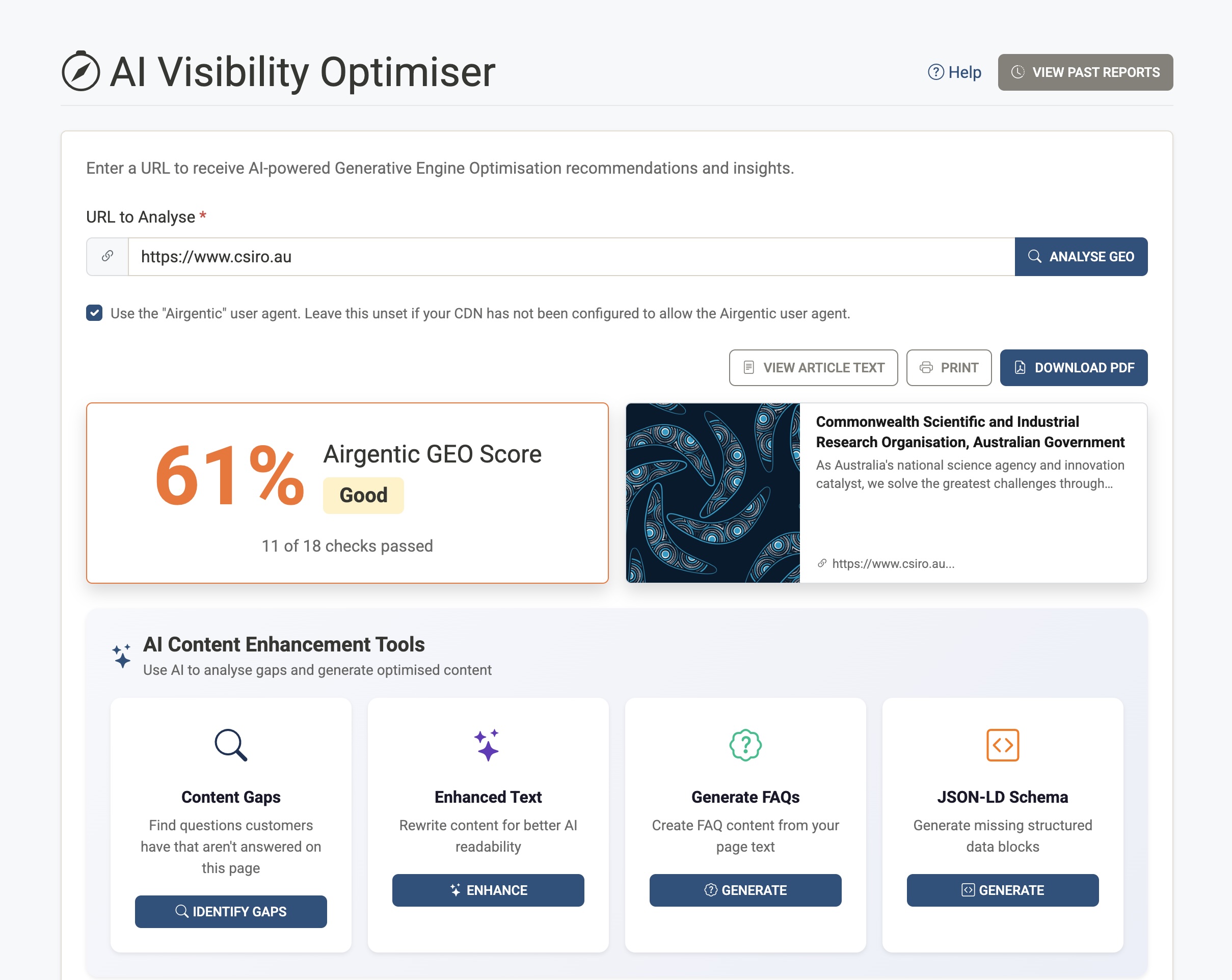
- In the admin console, go to AI Visibility Optimiser (breadcrumb: Home / AI Visibility Optimiser).
- Enter the URL of the page you want to analyse (e.g.
https://www.example.com/page). The tool will fetch the page and run 18+ checks. - Optional: Use the "Airgentic" user agent — Check this box if your CDN or firewall is configured to allow requests with the Airgentic user agent. Leave it unchecked if you haven't set that up; the tool can still analyse the page with a standard browser request.
- Click Analyse GEO. Analysis usually takes a short time; you'll see a progress message and then the results.
Your plan may limit how many page analyses you can run per month; the tool will tell you if you've reached that limit.
What you see after analysis
Score and summary
- Airgentic GEO Score — A percentage (e.g. 72%) that summarises how well the page is set up for AI visibility. Labels such as "Good", "Needs improvement", or "Poor" give a quick read.
- Checks passed — e.g. "13 of 18 checks passed", so you know how many of the 18 GEO signals passed or failed.
- Article preview — Title, description, and URL of the analysed page. From here you can open View Article Text (the main content extracted for analysis), Print, or Download PDF to share the report.
Recommendations (accordion)
Below the score, you'll see a list of recommendations. Each item is a check or finding (e.g. structured data, headings, metadata, quotability). Expand an item to read the detail and, where applicable, use the action buttons (e.g. Suggest Enhanced Text, Generate Missing JSON-LD, Generate FAQs) that appear for that recommendation.
AI Content Enhancement Tools
A dedicated section, AI Content Enhancement Tools, appears after the recommendations: "Use AI to analyse gaps and generate optimised content". It groups four kinds of actions:
- Content Gap Analysis — Identifies questions that customers ask AI about your product or industry that your page does not answer yet. Each gap can include why it matters and the risk of leaving it unanswered.
- Suggest Enhanced Text — Uses AI to propose more digestible wording (e.g. shorter sentences, active voice) for the main content so it's easier for AI to parse and cite.
- Generate FAQs — Generates draft FAQs from the page content that you can paste into your CMS to improve question coverage and quotability.
- Generate Missing JSON-LD — Produces ready-to-paste structured data (Article, FAQPage, Product, HowTo, etc.) so search and AI systems can understand and cite your page better.
These tools are available from the hub and often from within specific recommendations (e.g. "Suggest Enhanced Text" on a digestibility recommendation, "Generate Missing JSON-LD" on a JSON-LD recommendation).
The 18 GEO checks (summary)
The Optimiser runs 18+ analyses that reflect how generative engines evaluate sources. They include:
- Question coverage — Alignment with common AI-driven customer questions.
- Answer completeness — Whether the page fully answers likely follow-up questions.
- LLM Digestibility Index — How easy the page is for AI to parse and trust.
- Quotability Index — How likely the content is to be cited verbatim.
- Structured data (JSON-LD) — Presence, type fit, and completeness.
- FAQ readiness — Gaps and thin answers.
- Citation links — Outbound links that help AI verify claims.
- Image accessibility — Alt text, captions, duplicates.
- Heading structure — Clarity and hierarchy for chunking.
- Table accessibility — Captions, descriptions, header scope.
- Date signals — Last published/modified in metadata or body.
- Canonical URL — Preferred version and consistency.
- Metadata quality — Title, description, language, viewport, social tags.
- URL hygiene — Length and parameters.
- Page performance — Load/render indicators.
- Indexation hints — Robots, sitemaps, hreflang.
- Content evidence — Sources, quotes, attributions.
The report lists which of these passed or failed and gives concrete next steps.
Past reports and PDFs
- View Past Reports — From the AI Visibility Optimiser page, click View Past Reports to see a list of all analyses for your account. Each row shows date, URL (or page title), score, and checks passed. Click View to open the full report again.
- Print — On any report view, use Print to print the current report.
- Download PDF — Use Download PDF to save the report as a PDF for sharing or archiving.
Reports are snapshots at the time of analysis; re-run the Optimiser after you change the page to see updated scores and recommendations.
How this fits with AI Visibility Monitor
- AI Visibility Monitor — Shows where you appear (and don't) in AI search results and how you compare to competitors.
- AI Visibility Optimiser — Shows why a page is or isn’t likely to be cited and what to fix (structure, quotability, gaps, JSON-LD, etc.).
Use the Monitor to find under-performing pages or topics, then run those URLs through the Optimiser to get prioritised fixes. After you implement changes, run another Monitor scan to measure uplift.
FAQs (summary)
- What is Content Gap Analysis? — It shows which customer questions AI systems are likely to ask and where your page doesn’t yet answer them, with context on why each gap matters.
- Is this based on real AI behaviour? — Yes. Gap detection and recommendations are informed by how generative engines structure answers, select sources, and expand follow-up questions.
- Is this SEO? — Partly. GEO focuses on LLM visibility and citability; classic SEO helps, but the Optimiser is tuned for how AI answers are built.
- Do you change our content? — No. The tool suggests content and markup; you paste into your CMS and publish.
- Will this affect human UX? — Yes, positively. Clear headings, proper structure, and concise answers help both users and machines.
For more detail and examples, see GEO Advisor | Airgentic.