Help
The User Interface tab of Service Configuration controls the text labels and display behaviour visible to end users in the chat widget.
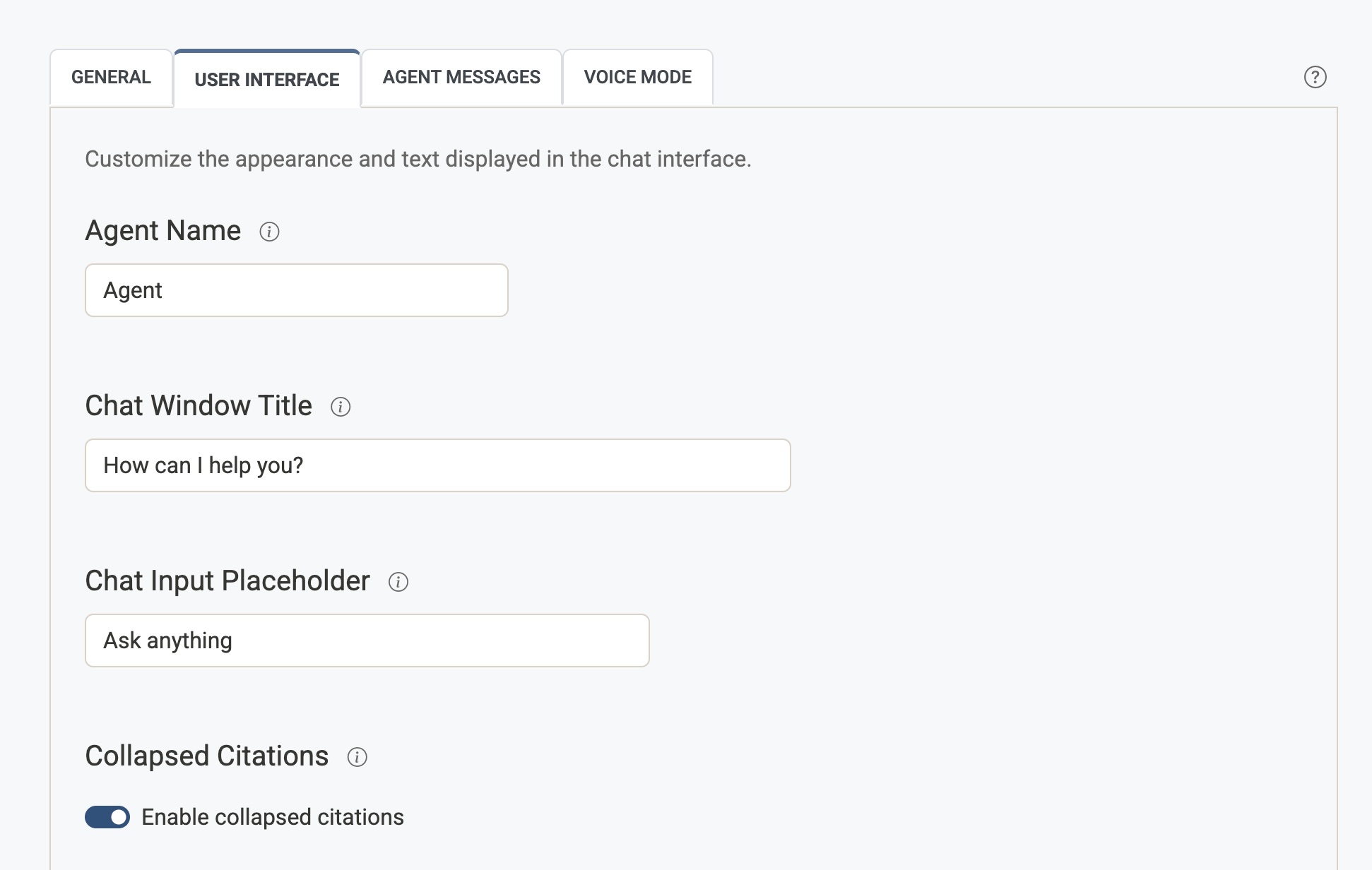
Agent Name
The label displayed next to each assistant message in the chat window. This is the name your users will see the AI responding as.
- Common values:
Agent,Assistant, or your brand name (e.g.Acme Support). - Leave blank to use the default (
Agent).
Chat Window Title
The heading text shown at the top of the open chat window — typically a greeting or invitation to engage.
- Example:
Hello, how can I help you? - This is the first thing users read when they open the chat widget.
Chat Input Placeholder
The grey placeholder text shown inside the chat input field before the user starts typing.
- Example:
Ask anything,Type your question here... - Keep it short and inviting.
Collapsed Citations
Controls how source links are displayed beneath AI responses.
- Enabled — Citations are hidden inside a collapsible "Sources cited" section. Users can expand it if they want to see the references. Keeps responses looking cleaner.
- Disabled — Citations are shown immediately below each response, always visible.
Images in Answers
When enabled, the agent can embed representative images from cited sources directly in the answer (for example a venue photo after a recommendation paragraph). Images still appear in Sources cited as usual.
- Enabled — The agent may insert images using excerpt numbers from retrieved content. Indexed pages must have a representative image (see Crawler Settings → Image Extraction).
- Disabled — Answers remain text-only; users see images only in Sources cited when available.
Chat Icon Visible
Shows or hides the floating chat icon that opens the hover widget.
- Enabled — The chat icon appears on pages that load the Airgentic script.
- Disabled — The icon is hidden. If nothing else on the page needs the hover widget (search overlay, custom open button), the hover widget is not initialised. Use this when you only embed Search or the Service Hub. If Remember hover widget state is on and the visitor left the panel open, the hover widget is still initialised so the chat can continue (the icon stays hidden).
A page can override this with data-chat-icon-visible on the script tag. See Website integration.
Wait until the chat icon is visible
Holds the floating chat icon and its callout until the icon is not covered by something else on the page, such as a cookie banner.
- Enabled — The icon and the callout stay hidden while another element covers the icon. When that element goes away (for example the visitor accepts cookies), the icon appears and the callout follows a few seconds later, beside the visible icon.
- Disabled — The icon and callout appear on their usual timing (the default). If a banner covers the icon, the callout can still stick out above the banner, because the callout is drawn in the same frame as the icon.
Leave this off unless something on the site covers the icon. If that something never goes away, the icon never appears.
A page can override this with data-chat-icon-wait-until-uncovered on the script tag. See Website integration.
Stored as chat_icon_wait_until_uncovered in your service configuration (off by default).
Remember hover widget state
When enabled, the floating hover chat remembers whether it was open or closed in this browser tab and restores that on the next page load.
- Enabled — If the visitor left the panel open, it opens again after navigation. If they closed it, it stays closed. State is stored in
sessionStorageand clears when the tab is closed. - Disabled — Each page load starts with the panel closed (the default).
This is separate from Persist chat across page loads, which restores the transcript. Enable both when you want the same conversation to continue with the panel still open.
Pages that hide the chat icon (data-chat-icon-visible="false" or Chat Icon Visible off) still restore an in-progress open panel so a visitor can keep chatting after following a link. The icon stays hidden on those pages, so visitors cannot start a new chat there.
Stored as remember_hover_widget_state in your service configuration (off by default).
Email transcript
When enabled, a visitor can email themselves a copy of the conversation. An envelope appears in the chat header of the hover widget, the Service Hub, and the search Ask tab once the assistant or a staff member has replied. The visitor enters one email address. The address is not saved on the device.
The email is the conversation the visitor saw: their messages, the assistant's replies, and staff replies. It does not include internal notes, tool calls, or search-context lines. It is sent from no-reply@airgentic.com with your organisation's name. Set a Reply-to address if replies should reach a mailbox you read. Leave it blank and the email says the mailbox is not monitored.
A visitor can ask for a few copies an hour. Further requests are asked to try again later. When reCAPTCHA is enabled for the service, each send is checked.
Stored as transcript_email_enabled (off by default) and transcript_email_reply_to in your service configuration.
Hover Widget Mode
Controls Human Handoff for the floating hover widget only. Search, the Ask tab, and Service Hub still follow the mode on Desk settings.
| Setting | What visitors see |
|---|---|
| Default | The hover widget uses the same desk mode as Ask (including staffed hours). |
| Human Only | The hover widget is live human chat whenever the desk is not AI Only. Overnight, on closed dates, or when you set the desk to AI Only, the widget follows the desk so the AI can still answer. |
Use Human Only when Search/Ask should stay as an AI assistant and the floating widget should connect visitors to a person during staffed hours.
Set a separate greeting on Agent Messages → Human Only Welcome Message.
External Script URLs
Some approved accounts may also see External Script URLs on this tab. This advanced setting loads hosted JavaScript files inside the Airgentic widget iframe.
Use it only for trusted scripts that have been reviewed by your organisation. Custom scripts may access chat or search content shown in the widget and may break after widget updates. See External Script URLs before enabling this setting.