Help
The User Interface tab of Service Configuration controls the text labels and display behaviour visible to end users in the chat widget.
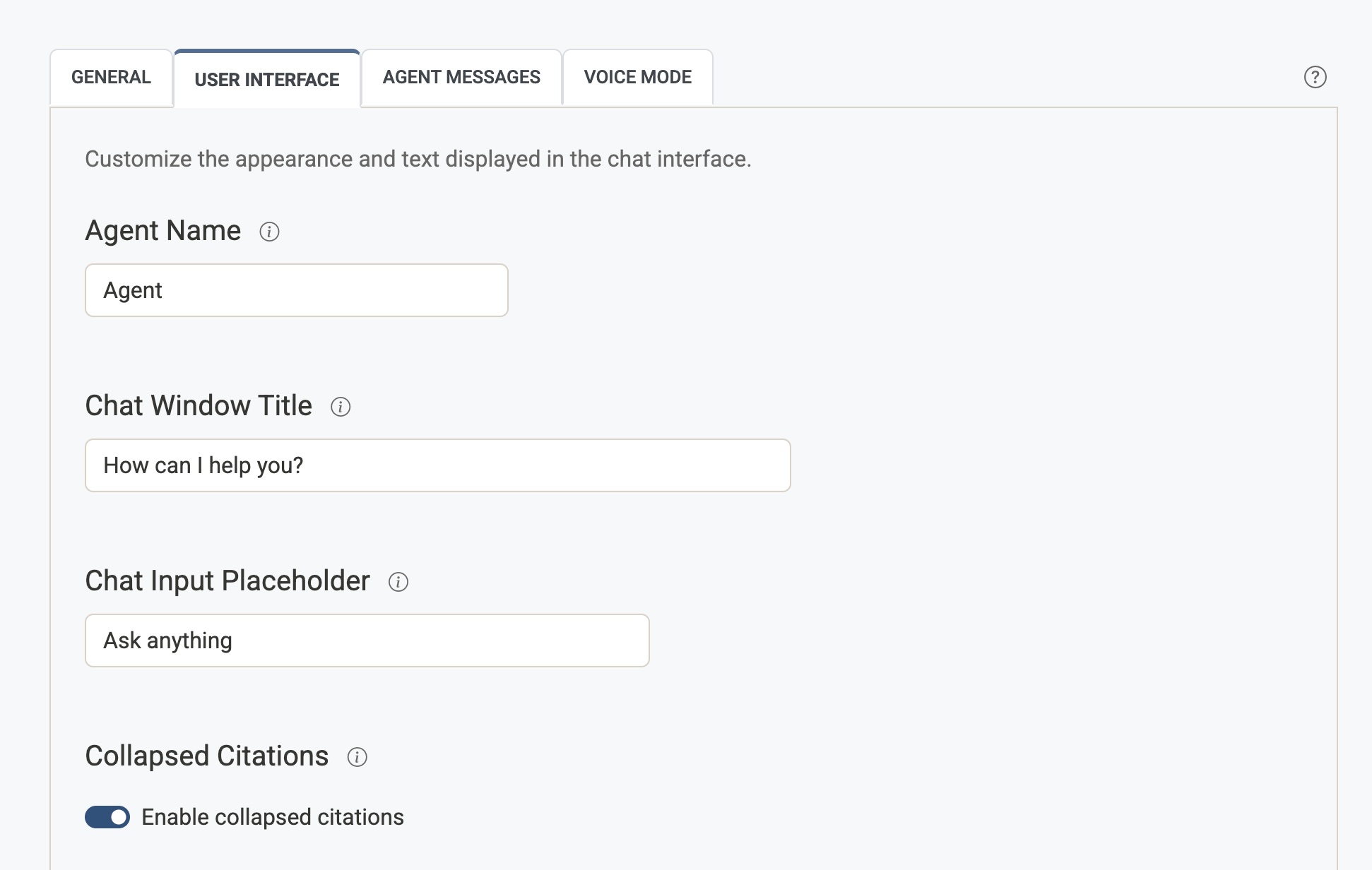
Agent Name
The label displayed next to each assistant message in the chat window. This is the name your users will see the AI responding as.
- Common values:
Agent,Assistant, or your brand name (e.g.Acme Support). - Leave blank to use the default (
Agent).
Chat Window Title
The heading text shown at the top of the open chat window — typically a greeting or invitation to engage.
- Example:
Hello, how can I help you? - This is the first thing users read when they open the chat widget.
Chat Input Placeholder
The grey placeholder text shown inside the chat input field before the user starts typing.
- Example:
Ask anything,Type your question here... - Keep it short and inviting.
Collapsed Citations
Controls how source links are displayed beneath AI responses.
- Enabled — Citations are hidden inside a collapsible "Sources cited" section. Users can expand it if they want to see the references. Keeps responses looking cleaner.
- Disabled — Citations are shown immediately below each response, always visible.
Images in Answers
When enabled, the agent can embed representative images from cited sources directly in the answer (for example a venue photo after a recommendation paragraph). Images still appear in Sources cited as usual.
- Enabled — The agent may insert images using excerpt numbers from retrieved content. Indexed pages must have a representative image (see Crawler Settings → Image Extraction).
- Disabled — Answers remain text-only; users see images only in Sources cited when available.
Chat Icon Visible
Shows or hides the floating chat icon that opens the hover widget.
- Enabled — The chat icon appears on pages that load the Airgentic script.
- Disabled — The icon is hidden. If nothing else on the page needs the hover widget (search overlay, custom open button), the hover widget is not initialised. Use this when you only embed Search or the Service Hub.
A page can override this with data-chat-icon-visible on the script tag. See Website integration.
Hover Widget Mode
Controls Human Handoff for the floating hover widget only. Search, the Ask tab, and Service Hub still follow the mode on Desk settings.
| Setting | What visitors see |
|---|---|
| Default | The hover widget uses the same desk mode as Ask (including staffed hours). |
| Human Only | The hover widget is live human chat whenever the desk is not AI Only. Overnight, on closed dates, or when you set the desk to AI Only, the widget follows the desk so the AI can still answer. |
Use Human Only when Search/Ask should stay as an AI assistant and the floating widget should connect visitors to a person during staffed hours.
Set a separate greeting on Agent Messages → Human Only Welcome Message.
External Script URLs
Some approved accounts may also see External Script URLs on this tab. This advanced setting loads hosted JavaScript files inside the Airgentic widget iframe.
Use it only for trusted scripts that have been reviewed by your organisation. Custom scripts may access chat or search content shown in the widget and may break after widget updates. See External Script URLs before enabling this setting.